Monday, 13 January 2020

EPM 11.2: OHS Changes

Yet another blog post on EPM 11.2! This time we are looking at the changes for EPM 11.2 related specifically to OHS.

The first thing you may be wondering is: how do you start the OHS server? Well it's a change from the previous few versions as OHS no longer uses OPMN for this task. Instead it uses Node Manager. If you followed the official installation and configuration guide you should have a service like the below:

With that service running we have some helper scripts to get OHS online. Browse to MIDDLEWARE_HOME\user_projects\FND1\httpConfig\ohs\bin\. Then run the following command to start OHS and store the epm_admin credentials so you aren't prompted later:

startComponent.cmd ohs1 storeUserConfig

To stop OHS simply run the command:

stopComponent.cmd ohs1

From now on you can start OHS with:

startComponent.cmd ohs1

It is a bit annoying to not have a nice Windows service to start that will bring OHS online but I might work on that soon.
If you completed the above, your OHS server is starting however it isn't listening on port 19000 but rather port 7777 then you need to copy all the files and folders from MIDDLEWARE_HOME\user_projects\epmsystem1\httpConfig\ohs\config\fmwconfig\components\OHS\ohs_component\ to MIDDLEWARE_HOME\user_projects\epmsystem1\httpConfig\ohs\config\fmwconfig\components\OHS\instances\ohs1.

The OHS configuration files are read from httpConfig\ohs\config\fmwconfig\components\OHS\instances\ohs1 - but the configtool only updates the files in httpConfig\ohs\config\fmwconfig\components\OHS\ohs_component. Don't ask me why they have duplicate folders! I picked up this tip from a comment by Dan C on the epmonprem.pro blog, so I can't take credit for that discovery.

Next if you want to know specifically which version of OHS (and the underlying version of Apache) is being used you can run the commands below. Change paths to suit your environment:

cd /d E:\Oracle\Middleware\ohs\ohs\bin
SET PATH=E:\Oracle\Middleware\ohs\ohs\bin;E:\Oracle\Middleware\ohs\bin;E:\Oracle\Middleware\ohs\oracle_common\bin;%PATH%
httpd.exe -version

You should see output like the below:

Server version: Oracle-HTTP-Server-12.2.1.3.0/2.4.25 (Win64)
Server built:   Aug 17 2017 20:40:27

If you need to change any configuration in OHS just be sure that the previous version of Hyperion used OHS 11.1.1.7, Apache 2.2, and some syntax is no longer valid. A common bit of customisation that I do, that thankfully still works in OHS 12.2.1.3, is changing the EPM logo in the logon page.

First browse to E:\Oracle\Middleware\EPMSystem11R1\common\epmstatic\bpmui\ and then create the path below:
E:\Oracle\Middleware\EPMSystem11R1\common\epmstatic\bpmui\themes\theme_skyros\images_global\

Next take a copy of the logon_panel.gif file, edit it and place it in this location. We will use an OHS configuration setting to ensure that our edited image is used, rather than the version in the Workspace WAR file.

Browse to E:\Oracle\Middleware\user_projects\FND1\httpConfig\ohs\config\fmwconfig\components\OHS\instances\ohs1\ and edit the file "epm_rewrite_rules.conf". Add the following line:

RewriteRule ^/workspace/bpmstatic/themes/theme_skyros/images_global/logon_panel.gif /epmstatic/bpmui/themes/theme_skyros/images_global/logon_panel.gif [PT]

Restart OHS. You will now see your updated logo!

Friday, 3 January 2020

EPM 11.2 Reusing a Single RCU Repository

Edit: some news here - Oracle Support is saying that actually the RCU doesn't need to be run for each server in your environment. To paraphrase slightly:

"EPM 11.2 requires Repository Creation Utility (RCU) to create schemas to support Oracle Enterprise Performance Management System Java web applications.
After running the RCU on your first server and before running EPM System Configurator on your second, the RCUschema.properties file on each EPM machine must be updated (on all your servers). There is no need to run the RCU on your other servers.
EPM Configurator "Deploy to Application Server" tasks will fail until Repository Creation Utility (RCU) has been run to create supporting Weblog schemas and EPM_ORACLE_HOME/common/config/11.1.2.0/RCUSchema.properties has been updated properly."

This appears to contradict what the documentation says, so we may have to wait for official clarification.


So the RCU is a new requirement for EPM installations with 11.2. Previously it was required for the EPMA batch client or the DRM web API deployment but now it is required for every EPM environment you wish to deploy.

One thing in the installation guide stuck out to me: "You must run RCU on each machine in your environment."

Excuse me: what?

I've had dealings with the RCU before, and never do you need to run it twice. The repository is created and then used. So I read that line with... let's say some scepticism. Once I actually went through the EPM configuration I found that, yes, the configtool will error out if you try to reuse a previously configured RCU repository. So you can't scale out without creating another prefix in the RCU for every server you have. I also found the RCU had shortcomings of its own.

What I say next is not official or supported in any way. It is of academic interest only, currently. But there is actually a reason why you can't reuse the RCU repository.

When you first run the configtool on your 2nd machine it will try to push some configuration into the tables you configured in the RCU. This configuration already exists, so that fails.

Subsequent runs of the RCU will then attempt to query the EPMSystem domain configuration to find those same tables. However the domain configuration hasn't been properly set up on that machine yet, so it will again fail. If it can find the domain configuration then it will work.

I have tested a method to get around this - it works flawlessly in my testing. The method is this:

  1. On your second machine, attempt the "Deploy to Application Server" tasks for your chosen applications. Let it run, fail and complete.
  2. Then browse to "E:\Oracle\Middleware\user_projects\domains\EPMSystem\" directory and rename the "config" folder to "config_old".
  3. Next copy the "config" folder from the location above on your first server, to the same location on your second server.
  4. Finally re-run the configtool, selecting the same "Deploy to Application Server" tasks. This time it will succeed.
As I said - this is just for information. I will probably raise an SR to get Oracle to address this issue, since it seems like just a silly mistake that the configtool tries to read the domain configuration when it isn't available on that machine.

EPM 11.2 WebLogic Server Startup Error

Just a quick one, if you are trying to start up a WebLogic service on EPM 11.2 (Planning, for instance) and you see in the sysout log the following error:

java.lang.IllegalArgumentException: Unable to use KSS for Demo Key Stores, KSS is unavailable

You should know that the reason for this is an entry missing in the classpath. Without this entry the service startup will fail.

To correct that, go to the Windows registry and browse to HKEY_LOCAL_MACHINE\SOFTWARE\Hyperion Solutions\Planning0\HyS9Planning_PLN1 (or equivalent).

Then look in the list of JVMOption properties for one with a value starting with "-Djava.class.path=". If you look at this value and scroll right to the end you should see a semicolon by itself. After that semicolon, insert:

E:\Oracle\Middleware\oracle_common\modules\internal\features\jrf_wlsFmw_oracle.jrf.wls.classpath.jar


Then the next time you start up the service it will work!

Oracle RCU Does Not Support SSL for SQL Server

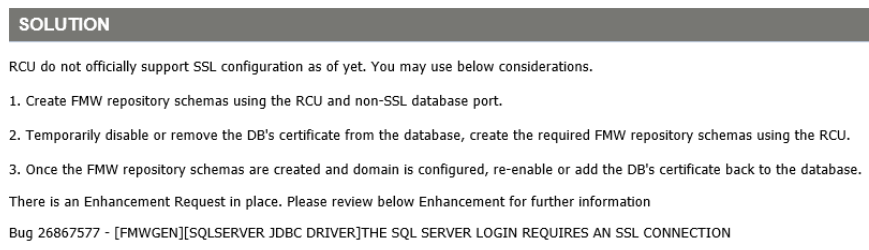
As the title suggests, this is just a warning to anyone in a highly security-conscious environment. If SSL connections for SQL Server are mandatory in your environment you will not be able to run the Oracle RCU, required before you can deploy applications to WebLogic.

There are 2 Oracle Support documents that cover this, DocID 2545309.1 and DocID 2343965.1.

The solutions given are thus:


I did wonder about migrating an RCU repository between SQL Servers. The interesting thing about running the RCU is that actually there is only one table that mentions server names at all. Assuming the database you ran the RCU against is called "OWSM" and the prefix you chose is "EPM" then you can check that by running the below command:

SELECT * FROM [OWSM].[EPM_STB].[COMPONENT_SCHEMA_INFO]


Theoretically that could mean that you could migrate between SQL instances just by editing  the DB_HOSTNAME column in this table - but I have no idea how much that would mess things up! Passwords appear to be embedded into SQL tables, so even though there are documents covering how to change the RCU schema passwords and change the data sources appropriately I am not sure if they could actually work in this case.

Monday, 23 December 2019

EPM 11.2: Downloads, Verification and Unzipping

So Oracle Hyperion EPM 11.2 has been released! For more information on that read here:
https://blogs.oracle.com/proactivesupportepm/epm_112

To download the files needed for the release you need to head over to Oracle eDelivery: https://edelivery.oracle.com

I should say that I think eDelivery is pretty flawed. If you select all the products you use you will get a huge list of downloads, with lots of duplicates and some probably unnecessary. You can use the wget shell script to get all of the downloads, de-duplicated, and there is also a download manager for Windows. But how do we know that we have all of the downloads we need - and that they are not corrupt?

In the eDelivery interface there is a "view digest" link that will show you the SHA1 and SHA256 hashes for each download - this is what we will use to verify our downloads. I will be using Windows for these steps. The table below lists each ZIP file with the corresponding description and SHA1 hash. You can use the download manager to ensure each ZIP is downloaded, then use sha1sum.exe from the ancient but still useful UnxUtils (UnxUpdates.zip file has it) to check all the hashes with:

sha1sum *.zip


ZIP File Name Download Description SHA1 Hash
V44413-01.zip Oracle WebLogic Server 12.1.3.0.0 for Microsoft Windows x64 (64-bit) 02B2EB70A5B208EE20083E9DA833983D98F00DD5
V44425-01.zip Oracle Data Integrator 12.1.3.0.0 for Microsoft Windows x64 (64-bit) A4B97264516F1A75AA33F5FAA0D49AAB32C0558C
V886440-01.zip Oracle Fusion Middleware 12c (12.2.1.3.0) SOA Suite and Business Process Management 8D65D949C862CB4652D2D28D69BEEDD4DF918B39
V886442-01_1of2.zip Oracle Fusion Middleware 12c (12.2.1.3.0) SOA Quick Start (Part 1) 2B308A22414861073937345379CBEAE6346A37FA
V886442-01_2of2.zip Oracle Fusion Middleware 12c (12.2.1.3.0) SOA Quick Start (Part 2) E2F05CA1060C266D119FEF7055158354FAF638D8
V886451-01_1of2.zip Oracle Fusion Middleware 12c (12.2.1.3.0) Data Integrator (Part 1) D80310331C0003F27752AB4AEB8747A3FB609DB3
V886451-01_2of2.zip Oracle Fusion Middleware 12c (12.2.1.3.0) Data Integrator (Part 2) 76450D1FC463B7EBF2057C6C548D694409854211
V933015-01.zip Oracle Fusion Middleware 12c (12.2.1.3.0) Internet Directory for Microsoft Windows x64 (64-bit) CF09129C9E1D974749094E230792DB4C0B2C5F7E
V933018-01_1of2.zip Oracle Fusion Middleware 12c (12.2.1.3.0) Identity and Access Management Quick Install (Part 1) 64CD01DC271999DF0B399E59805C3A21F65E5898
V933018-01_2of2.zip Oracle Fusion Middleware 12c (12.2.1.3.0) Identity and Access Management Quick Install (Part 2) C953B5CD7EC299BD7A89C14218AEEB0C2AD37877
V984488-01.zip Oracle Enterprise Performance Management System - Client Installers 11.2.0.0.0 DCE5074A714C815B07400DD8E6CA268E6D707EB4
V984490-01.zip Oracle Data Relationship Management Analytics 11.2.0.0.0 1F66F76BC62FCA2E3F4A1735BE58B428D47C9051
V984500-01.zip Oracle Enterprise Performance Management System D0195470D9A8385992E5BE8016B4AF266F491BD4
V984501-01.zip Oracle Enterprise Performance Management System - Part 2 11.2.0.0.0 CE1DD9F9F8F6FB0561EB6629D745C93F8FFE7C71
V984502-01.zip Oracle Enterprise Performance Management System - Oracle HTTP Server 11.2.0.0.0 CB6A70C25BED9464ACFC22A7D0CF0C3FC5AC7F47
V984503-01.zip Oracle Enterprise Performance Management System - Part 3 11.2.0.0.0 9BB8656A7FD9B530CD1A5E67957296CB36BC762D
V984508-01.zip Oracle Enterprise Performance Management System - Part 4 11.2.0.0.0 1559F2C2516C8066F7B7BB374EBF54D2E01C4F43
V984509-01.zip Oracle Enterprise Performance Management System - Part 5 11.2.0.0.0 280B3A71A17322D5F37DA1900E869BA4C275397E
V984510-01.zip Oracle Enterprise Performance Management System - Part 6 11.2.0.0.0 F4A17A30B087DDC2B9DEB68E0CC61A11FD458385
V984513-01.zip Oracle Data Relationship Management 11.2.0.0.0 D80F46580880062C448D9754AA9BA068F556FA0D
V984542-01.zip Oracle Enterprise Performance Management System - Installation Documents and Readmes 11.2.0.0.0 DA35B3760F1F0830CB16BC5A7FD014BD6BCBD527

The results from sha1sum should look like the below:

02b2eb70a5b208ee20083e9da833983d98f00dd5 *V44413-01.zip
a4b97264516f1a75aa33f5faa0d49aab32c0558c *V44425-01.zip
2b308a22414861073937345379cbeae6346a37fa *V886442-01_1of2.zip
e2f05ca1060c266d119fef7055158354faf638d8 *V886442-01_2of2.zip
d80310331c0003f27752ab4aeb8747a3fb609db3 *V886451-01_1of2.zip
76450d1fc463b7ebf2057c6c548d694409854211 *V886451-01_2of2.zip
cf09129c9e1d974749094e230792db4c0b2c5f7e *V933015-01.zip
64cd01dc271999df0b399e59805c3a21f65e5898 *V933018-01_1of2.zip
c953b5cd7ec299bd7a89c14218aeeb0c2ad37877 *V933018-01_2of2.zip
dce5074a714c815b07400dd8e6ca268e6d707eb4 *V984488-01.zip
1f66f76bc62fca2e3f4a1735be58b428d47c9051 *V984490-01.zip
d0195470d9a8385992e5be8016b4af266f491bd4 *V984500-01.zip
ce1dd9f9f8f6fb0561eb6629d745c93f8ffe7c71 *V984501-01.zip
cb6a70c25bed9464acfc22a7d0cf0c3fc5ac7f47 *V984502-01.zip
9bb8656a7fd9b530cd1a5e67957296cb36bc762d *V984503-01.zip
1559f2c2516c8066f7b7bb374ebf54d2e01c4f43 *V984508-01.zip
280b3a71a17322d5f37da1900e869ba4c275397e *V984509-01.zip
f4a17a30b087ddc2b9deb68e0cc61a11fd458385 *V984510-01.zip
d80f46580880062c448d9754aa9ba068f556fa0d *V984513-01.zip
da35b3760f1f0830cb16bc5a7fd014bd6bcbd527 *V984542-01.zip

Please note that in terms of what most people would actually need to download I would say everything from V984488-01.zip to V984542-01.zip and everything else you can get as and when you need it.

So now we need to extract all the ZIP files with their correct paths. For this I would recommend using 7za.exe - you can get it from the 7za920.zip 7-Zip package on SourceForge. 7za is a command-line program for zipping and unzipping multiple different types of archive. We can use the "-o" switch to 7za to set the folder we want to extract to - this is important to ensure that the documentation, client installers and DRM/DRMA components go into their own folders. So move the ZIP files mentioned above into your destination folder, make sure 7za.exe is in the PATH and run the following commands:

7za x -y -oClient_Installers V984488-01.zip
7za x -y -oDRM V984490-01.zip
7za x -y V984500-01.zip
7za x -y V984501-01.zip
7za x -y V984502-01.zip
7za x -y V984503-01.zip
7za x -y V984508-01.zip
7za x -y V984509-01.zip
7za x -y V984510-01.zip
7za x -y -oDRM V984513-01.zip
7za x -y -oDocumentation V984542-01.zip

Now we should have our installation package set up and ready to use! In the next blog post I will go over actually creating the EPM 11.2 installation.

Tuesday, 8 October 2019

EPM 11.2 Essbase Issues

So 11.2 wasn't (and won't be) released in September. The news from Oracle OpenWorld 2019 and EPM Community Today is that it will now be released in October.

One of the nice tidbits that came out from those conferences is that EPM 11.2 will initially use Essbase 11.1.2.4, and will later use Essbase 19c. That sounds like good news, right?

Well maybe it will actually make things more complicated. See Essbase 11.1.2.4 is certified for Windows Server 2008 and 2012, SQL Server 2008 and 2012. RHEL 5 and 6 and Oracle Linux 5 and 6 are also supported. OracleDB 10, 11, 12.1 and 12.2 are supported.

Essbase 19c is slated for a June 2020 release. Essbase 19c will initially support OEL and Red Hat 7. Other operating systems will use a Docker based solution for support in the near term. No SQL Server support details has been published yet. OracleDB 12.1, 12.2 and 18c are supported.

EPM 11.2 will support Windows Server 2016 and 2019, SQL Server 2016 and 2017. It will initially release with no support for Linux, with RHEL and OEL 7 support to come after. OracleDB 12.2 will be supported.

So in order to be supported for EPM 11.2 and Essbase 11.1.2.4, your Essbase servers would need to be Windows Server 2012 and the rest of the environment would need to be Windows Server 2016. The same for SQL Server.

If you are a Linux shop you'd be able to use RHEL6 for the Essbase servers and RHEL7 for everything else. Luckily you can use OracleDB 12.2 for both EPM 11.2 and Essbase 11.1.2.4.

However if you want to upgrade to Essbase 19c then you would also need to upgrade the operating system to a supported version, either upgrading from Window Server 2012 to whatever version will be supported by Essbase 19c or from RHEL 6 to RHEL7.

These are hard decisions to be made by the infrastructure architect. You don't want to be out of support - but you also can't support a large upgrade a mere year after 11.2 is released.

Oracle OpenWorld 2019 presentations used for information: CON4713, PRO5411

Tuesday, 18 June 2019

Oracle Hyperion EPM 11.2 Announcement

Tomorrow is the 2nd day of the UKOUG Applications Unlimited 2019 event, where there is a session scheduled to discuss the Oracle Hyperion EPM roadmap, including details of 11.2

It appears in anticipation of this Oracle has released the following document:

https://www.oracle.com/a/ocom/docs/support/hyperion-epm-announcement.pdf

The title of the document is "Announcing Continuous Innovation on Oracle Hyperion Enterprise Performance Management System 11.2".

Most of the information in the document isn't new to people who have been keeping up to date with the snippets of information Oracle have been releasing thus far. Essentially EPM 11.2 will be kept "evergreen" with technology and feature updates through PSUs - no more maintenance releases.

It features this nice graphic:


To summarise I will paste from the PDF:

"Ongoing Applications Updates—ongoing updates to Oracle Hyperion EPM System 11.2 applications code, analogous to the 11.1.2.4.x updates we have made available on an approximate annually basis. Updates will be cumulative and will combine bug fixes and new features into a consolidated patch set that can be easily applied with O-Patch."

"Ongoing Technology Stack Updates—ongoing updates to allow for the needed refresh of the Oracle Fusion Middleware platform technologies underlying the Oracle Hyperion EPM System. These will allow customers to obtain new versions of the technology stack without upgrading the Oracle Hyperion EPM System applications code."

It also mentions the support policy for 11.2, this is described in another document:

http://www.oracle.com/us/products/applications/applications-unlimited-1970561.pdf

Essentially, Oracle will not stop Premier Support on 11.2 before 2030 and will make a decision every year on whether or not to extend Premier Support for another year after that. So if Oracle decides every year for the next 5 years to extend the support then you would have Premier Support until 2035.

If you are wondering what Premier Support actually means: there are 3 support levels - Premier, Extended and Sustaining Support. The differences can be described in the table below:


Premier Support
Extended Support
Sustaining Support
Major Product and Technology ReleasesYESYESYES
24x7 assistance with service requestsYESYESYES
Access to My Oracle Support including Knowledge BaseYESYESYES
Software and Operating System UpdatesYESYESPRE-EXISTING
Security AlertsYESYESPRE-EXISTING
Critical Patch UpdatesYESYESPRE-EXISTING
Tax, Legal, and Regulatory UpdatesYESYESPRE-EXISTING
Upgrade Tools/ScriptsYESYESPRE-EXISTING
Access to Platinum ServicesYESYESNO
Certification with most existing Oracle products/versionsYESYESNO
Certification with most existing third-party products/versionsYESYESNO
Certification with most new third-party products/versionsYESNONO

I will add more details to this post as we get more information over the coming days.

Edit: a bit late to the party but - here we go!

The big thing everyone wanted to know was "when is 11.2 going to be released?" The answer Oracle has given us is September 2019. If that isn't much comfort given previous deadlines they also said that the release will be done by Oracle Openworld at the very least (15 Sep 2019 to 19 Sep 2019). I think that makes sense, they want everything ready for their big announcements at Openworld.

Something they have mentioned is that basically 11.2 is 11.1.2.4 on Fusion Middleware 12g. This should make it a bit easier to upgrade - with a caveat that no in-place upgrade is supported from 11.1.2.4 to 11.2 - and should make folks happy they won't have to completely rewrite their tools to integrate with 11.2 (a sigh of relief from the developers of EPM Maestro and Accelatis, I'm sure!). Something they did mention is that there is around 50 to 100 exclusive bug fixes for 11.2, mostly related to things that cannot be fixed on the current platform. For instance support for TLS 1.2 is not possible with EPM 11.1.2.4 - see John G's excellent blog post https://john-goodwin.blogspot.com/2019/03/hybrid-fdmee-and-upcoming-oracle-cloud.html.

Something that (luckily) won't affect us but definitely will affect other customers is that EPMA is now officially being killed off. I seem to remember that rumours of EPMA's demise were dismissed as "fake news" 2 years ago - unfortunately I can't seem to find the slide but I'm sure I heard it! In any case it is being replaced with a license-restricted version of DRM - similar to how FDMEE includes a license-restricted version of ODI.

Some other fatalities include Workforce Planning, Strategic Finance, Essbase Analytics Link and the Simplified User Interface for Planning. Basically Oracle's reasoning was to kill off features too few customers actually use. I'm sure the death of EAL will be mourned by everyone except for the people who actually had to use it :)

Most of the other announcements had been heard before. Reporting and Analysis is no more (I won't be shedding a tear for that one), new features and certifications will be released in PSUs and now Essbase is a separate produce from EPM - so it seems that Essbase will stay on the 11.1.2.4 version for the time being.